



Industrial OpenVPN Server eFive
Industrial OpenVPN server
Product discontinuation as of 31.12.2019
If you have any questions, please contact ourtechnical application support teamatCustomer Service. We will be happy to advise you on alternatives.
- Central OpenVPN server
- Coordinated with Ewon Flexy and Cosy routers
- For 24 h connection with your machines
- Up to 200 permanent connections possible
- Simple configuration via web server
- Integrated firewall
- Certificate server for X.509
- DMZ port
Product discontinuation:
The eFive 25 and 100 industrial OpenVPN servers will be discontinued on 31.12.2019. The last order option was until 02.09.2019. We would be happy to advise you on alternatives.Please get in touchwith our application consultants.
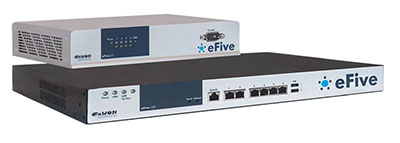
eFive is a dedicated VPN server for all eWON industrial routers with integrated VPN.
There are two different versions to choose from: eFive 25 and eFive 100, which enable up to 50 and 200 permanent VPN remote connections respectively.
Both are easy to operate and manage via the integrated web-based user interface.
The configuration wizard integrated in the Ewon routers is available for setting up a complete industrial extranet with just one mouse click.
The setup with eFive and the Ewon routers enables the use of classic SCADA software for monitoring and remote control of your applications.
VPN mode:
- SSL/TLS VPN (Open VPN)
- Encryption: DES, 3DES, AES, 128-, 192-, 256-bit
- Authentication: Pre-shared key, X.509, Certification Authority
Routing:
- VPN bridge mode
- Destination based routing
NAT:
- Static NAT (port translation)
- 1:1 NAT
Ethernet interfaces:
1 interface each for:
- WAN
- LAN
- DMZ
- WLAN
Serial interface:
For console application via SSH access
USB interfaces:
Memory stick backup option



Reliable operation and intelligent remote maintenance
 Download (1.23 MB)


Remote maintenance via the Internet and mobile communications
Download (296.59 KB)


With Ewon, all parameters in a central location at a glance
Download (447.85 KB)


is a universal tool for reading out and setting up Ewon routers, updating firmware, saving and restoring the configuration.
By downloading and using software and apps from this homepage, I agree to the terms and conditions and the supplementary software clause.

is used to connect your PC to your Ewon router via Talk2M using a VPN tunnel. This allows access from your PC to the network connected to your Ewon router as if you were connected locally. User and device management as well as insight into the connection report is also done via eCatcher.
By downloading and using software and apps from this website, I agree to the terms and conditions and the supplementary software clause.

enables a connection test to Talk2m from your PC. Various parameters are checked and you receive feedback.
By downloading and using software and apps from this website, I agree to the terms and conditions and the supplementary software clause.

emulates a serial interface (COM port) on your PC which is linked to the serial or MPI interface of the Ewon router. This allows you to access serial and MPI devices remotely.
By downloading and using software and apps from this homepage, I agree to the terms and conditions and the supplementary software clause.

Use this *.cfg file to import an Ewon router into your SIMATIC Manager. Suitable for Technical Note 0401 eWON.
By downloading and using software and apps from this homepage, I agree to the terms and conditions and the supplementary software clause.
 Download (1.44 KB)

Import this library into your TIA portal.
(Ewon Gateway station library for TIA V11)
Suitable for Technical Note 0401 eWON.
By downloading and using software and apps from this website, I agree to the terms and conditions and the supplementary software clause.

Import this library into your TIA portal.
(Ewon Gateway station library for TIA V12)
Suitable for Technical Note 0401 eWON.
By downloading and using software and apps from this website, I agree to the terms and conditions and the supplementary software clause.
Import this library into your TIA portal.
(Ewon Gateway station library for TIA V13)
Suitable for Technical Note 0401 eWON.
By downloading and using software and apps from this homepage, I agree to the terms and conditions and the supplementary software clause.
Import this library into your TIA portal.
(Ewon Gateway station library for TIA V14)
Suitable for Technical Note 0401 eWON.
By downloading and using software and apps from this website, I agree to the terms and conditions and the supplementary software clause.



Remote maintenance of a Siemens/VIPA control system
Status 10/2014
Download (2.81 MB)

Remote maintenance of a Hitachi control system
Status 04/2011
Download (789.47 KB)

Remote maintenance of an Omron controller
Status 03/2014
Download (831.06 KB)

Remote maintenance of a Jetter controller
Status 04/2013
Download (256.28 KB)




Technical Note Ewon 0301
variables (tags) from a Siemens/VIPA controller
read out.
Status 03/2014
Download (0.98 MB) 
Technical Note Ewon 0302
variables (tags) from a Rockwell Automation controller
read out.
Status 10/2010
Download (1.19 MB) 
Technical Note Ewon 0303
Read variables (tags) via Modbus RTU and TCP.
Status 04/2011
Download (1.04 MB) 
Technical Note Ewon 0304
Read variables (tags) from a Hitachi controller.
Status 10/2010
Download (0.91 MB) 
Technical Note Ewon 0305
Read variables (tags) from a Mitsubishi control unit.
Status 05/2011
Download (849 KB) 
Technical Note Ewon 0306
Read variables (tags) from an Omron controller.
Status 07/2011
Download (1.30 MB) 
Technical Note Ewon 0307
Read variables (tags) from a Jetter controller.
Status 04/2013
Download (1.02 MB) 
Technical Note Ewon 0401
Remote maintenance of a Siemens/VIPA control system
Status 10/2014
Download (2.81 MB) 
Technical Note Ewon 0404
Remote maintenance of a Hitachi control system
Status 04/2011
Download (789 KB) 

Technical Note Ewon 0408
Remote maintenance of a Beckhoff controller
Status 03/2014
Download (415 KB) 
Technical Note Ewon 0601
Establishing a VPN connection with Talk2M
Status 10/2017
Download (2.00 MB) 



 to top
 Contact
 Request form