



Ewon Netbiter EasyConnect
Remote maintenance gateway for connection to the Netbiter Argos Cloud solution
This product has been discontinued
Replaced by: EasyConnect 360/360W
- Powerful ARM Cortex processor for fast data cycles
- Two separate Ethernet interfaces (WAN and LAN) enable secure communication with your field equipment
- You can connect additional signals and sensors directly to the Netbiter gateway via the analog and digital inputs and outputs
- Transparent conversion from Modbus RTU to Modbus TCP
- Integrated temperature sensor
- 6 status LEDs provide detailed diagnostic options
- Supports all Netbiter Argos service packages:
Remote Access, View & Control and Manage & Analyze
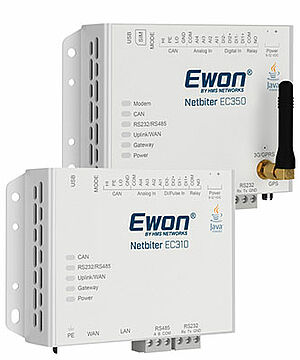
The Netbiter EasyConnect gateway is for remote PLC access and cloud-based production data acquisition.
You can connect the Netbiter EasyConnect to your PLC, system controller or other field devices via the following interfaces: serial via RS-232/485 and Modbus-RTU or Ethernet-based via Modbus-TCP, EtherNet/IP or SNMP. The J1939 protocol is supported via CAN interface.
The gateway sends the log data to the Netbiter Argos cloud-based data portal via the Internet (Ethernet) or mobile communications. You can also connect additional sensors or other equipment directly to the gateway via the EC350's I/O connections.
Simple commissioning
Wherever your systems and devices are located: Simply connect them to a Netbiter EasyConnect gateway and access the operating data online via a standard web browser. The plug-and-play function allows you to set up even large installations quickly. You don't need to be an IT or mobile communications expert to do this.
2G (GPRS) support (EC320 only)
As a cost-effective alternative to the 3G version, the EC320 can be used where remote data acquisition, alarming and visualization are the main focus and no direct access (remote access) to a controller or field device with its software is required.
3G (HSPA+) support (EC350 only)
A major advantage of 3G communication is the significantly better performance compared to GPRS and the ability to establish a connection in regions where there are only 3G mobile networks. With support for 5 different 3G frequency ranges, the Netbiter EC350 can be used worldwide. The higher transmission speed of 3G is particularly useful for remote access to systems and control units with the associated software.
Data security
The Netbiter EasyConnect Gateway enables secure access to your system data via the Internet. Firewalls are no obstacle. Even fixed, public IP addresses, VPN tunnels or expensive M2M-specific SIM cards are not necessary. The gateway communicates with Netbiter Argos via a TLS-encrypted connection.
Supported protocols
MODBUS/RTU, MODBUS/TCP, EtherNet/IP™, SNMP, SAE J1939
Interfaces:
1x RJ45 Ethernet WAN 10/100 Mbit/s
1x RJ45 Ethernet LAN 10/100 Mbit/s
1x CAN (10 kbit/s to 1000 kbit/s)
1x RS232 (Rx, Tx, GND, 1.2 kbit/s to 115.2 kbit/s)
1x RS485 (1.2 kbit/s to 115.2 kbit/s)
1x USB interface
1x SMA antenna connection for the 3G/GPRS modem (EC320/EC350 only)
1x SMA antenna connection for GPS (EC320/EC350 only)
Mobile radio standards:
EC320 (NB1021):
GSM / GPRS / EDGE QuadBand (850, 900, 1800, 1900 MHz)
EC350 (NB1007):
GSM / GPRS / EDGE QuadBand (850, 900, 1800, 1900 MHz)
HSPA + Pentaband (800/850, 900, 1900, 2100 MHz)
Power supply:
9 to 32 VDC
EC310: 2.5 W
EC320/EC350: 4.5 W
Weight:
< 500 g
Dimension:
D x H x W: 27 x 92 x 135 (mm)
Ambient temperature:
Operation: -40 °C to +65 °C
Storage: -45 °C to +85 °C
Humidity:
10 to 95 %, non-condensing
Inputs and outputs:
4x analog input 0/4-20mA, 0-10V, PT100
2x digital input potential-free
1x relay output (24 V AC/DC, 1A)
Assembly:
Wall, top-hat rail (via adapter)
Protection class:
IP20
Conformities:
EC310: CE, CULUS, RCM
EC320: CE, UL, FCC
EC350: CE, CULUS, RCM, JATE, Telec, FCC, IC, PTCRB
Manufacturer:
HMS Industrial Networks AB


Is required to use remote access (remote access function) with Netbiter. This tool is used to establish an encrypted connection from the PC on which the software is installed via Netbiter Argos to the Netbiter EasyConnect gateway
This enables direct access to the Ethernet-based or serial devices connected to the gateway with their software.
By downloading and using software and apps from this homepage, I agree to the GTC and the supplementary software clause.



Technical Note Ewon 0301
variables (tags) from a Siemens/VIPA controller
read out.
Status 03/2014
 Download (0.98 MB)
Technical Note Ewon 0302
variables (tags) from a Rockwell Automation controller
read out.
Status 10/2010
Download (1.19 MB) 
Technical Note Ewon 0303
Read variables (tags) via Modbus RTU and TCP.
Status 04/2011
Download (1.04 MB) 
Technical Note Ewon 0304
Read variables (tags) from a Hitachi controller.
Status 10/2010
Download (0.91 MB) 
Technical Note Ewon 0305
Read variables (tags) from a Mitsubishi control unit.
Status 05/2011
Download (849 KB) 
Technical Note Ewon 0306
Read variables (tags) from an Omron controller.
Status 07/2011
Download (1.30 MB) 
Technical Note Ewon 0307
Read variables (tags) from a Jetter controller.
Status 04/2013
Download (1.02 MB) 
Technical Note Ewon 0401
Remote maintenance of a Siemens/VIPA control system
Status 10/2014
Download (2.81 MB) 
Technical Note Ewon 0404
Remote maintenance of a Hitachi control system
Status 04/2011
Download (789 KB) 

Technical Note Ewon 0408
Remote maintenance of a Beckhoff controller
Status 03/2014
Download (415 KB) 
Technical Note Ewon 0601
Establishing a VPN connection with Talk2M
Status 10/2017
Download (2.00 MB) 



 to top
 Contact
 Request form