


SpiderControl™ AutomationBrowser
HTML5 web browser for industrial panels
- Compatible with older Java applets (e.g. CODESYS 2.3 Webvisu)
- PLC station lists for navigating to different web servers and back
- Single Sign On (SSO)
- Collective alarm
- Cloud connectivity
- Simple PLC logic in the browser, and much more.
Please install the desired free software from the Downloads / FAQ section first. Then select the appropriate license category for your desired product in the web store and complete the automatic ordering process. After installation, the software generates the so-called "challenge code". You must enter this code in the reference text of the shopping cart when purchasing the license. After completing the purchase, you will receive the appropriate "activation or response code" by e-mail with the invoice.
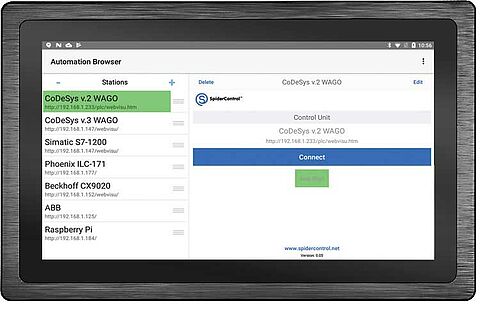
The SpiderControl™ AutomationBrowser from iniNet Solutions is an HTML5 web browser for industrial panels and contains many additional features in addition to standard functions. This means that older web HMIs based on Java applets that are no longer supported by common browsers, such as CODESYS Webvisu V2.x, can be used.
The AutomationBrowser can be used universally and offers enormous advantages:
- Compatible with older Java applets (e.g. CODESYS 2.3 Webvisu)
- PLC station lists for navigating to different web servers and back
- Start in kiosk mode
- Option to return from PLC to station list (also in kiosk mode)
- On-screen keyboard can be activated by the user at any time (via floating button)
- Supports not only http URLs, but also VNC (remote desktop) and RTSP (video streaming)
- Easy integration of external devices as input: e.g. RFID, scanner,...
- Configuration changes can be blocked for end users
- Single Sign On (SSO)
- Collective alarm
- Cloud connectivity
- Simple PLC logic in the browser, and much more.
Installation instructions:
Please first install the desired free software from the Downloads / FAQ section. Then select the appropriate license category for your desired product in the web store and complete the automatic ordering process.
After installation, the software generates the so-called "challenge code". You must enter this code in the reference text of the shopping cart when purchasing the license. After completing your purchase, you will receive the appropriate "activation or response code" by e-mail together with the invoice.

 Download




 to top
 Contact
 Request form