


Chapter 3:
Ensure security & reliability of remote access
While the Internet gives you remote access to networks and machines around the world, offering many business benefits, it also opens up opportunities for malicious cyberattacks - a risk that is unfortunately all too common today. In this chapter, you will learn the basics of cybersecurity and how Ewon protects your computers and data with the Talk2m security architecture based on the principle of "deep penetration".
An overview of the current threat potential
Major security breaches, usually involving credit card fraud and identity theft, are frequently in the news. However, much more threatening - and potentially devastating - are cyber attacks on critical infrastructure and machinery, such as public utilities, emergency systems, building control systems and industrial plants.
The data breach at US retailer Target in 2013 resulted from an attacker being able to penetrate Target's corporate network via a connected maintenance system for heating, ventilation and air conditioning (HVAC) systems.
Politically or socially motivated hacker groups can also attempt to cause targeted damage to internet-connected industrial machines. Another threat can come from nation states attacking machines to achieve different goals.
For example, the Stuxnet worm discovered in 2010 is believed to have been developed by one or more nations to sabotage Iran's nuclear program. The worm infected vulnerable programmable logic controllers (PLCs) and Siemens Step7 software at Iran's nuclear facilities in Natanz. As a result, centrifuges were manipulated to run at variable speeds. This led to excessive vibrations and destroyed the centrifuges.
Security must therefore be a top priority for all machine manufacturers, original equipment manufacturers (OEMs) and system integrators - especially if they want to make their customers' machines accessible remotely via the Internet.
Machines can be attacked to achieve a wide variety of goals.
For example, it is again considered likely that the Stuxnet worm discovered in 2010 was developed by one or more nations to compromise the Iranian nuclear program. The worm infected vulnerable PLCs and Siemens Step7 software in the nuclear facilities in Natanz. This caused centrifuges to rotate at variable speeds, triggering strong vibrations and destroying the centrifuges.
This is why security is essential for machine builders, OEMs and system integrators if you want to enable a remote connection to your customers' machines via the Internet.
Understanding firewalls and virtual private networks (VPNs)
Firewalls control data traffic between networks - for example, between a local area network (LAN) and the Internet. A firewall is usually installed at the edge of the network to be protected. It can be implemented as a hardware appliance, as software or as a combination of hardware and software.
You can think of a router (which I discuss in Chapter 2) as the gateway to a medieval castle - and the firewall as the drawbridge at the entrance that controls access to the castle.
Although there are many advanced firewall designs and technologies, the basic function of a firewall remains the same: it inspects all incoming traffic from an untrusted network (for example, the Internet) against a set of configured rules.
By default, all outgoing traffic from the trusted network is allowed - for example, from the LAN to the Internet. Incoming traffic sent in response to an active outgoing connection is allowed dynamically. For example, if a PC user opens a web browser in a corporate LAN andwww.ewon.biz the firewall automatically allows the incoming website traffic to pass because it is a response to the request initiated by the browser.
On the other hand, inbound traffic that is not explicitly associated with an outbound request is blocked by default. If you want to allow specific incoming traffic from the Internet, you must configure firewall rules to allow a specific type of traffic from a specific source to a specific destination.
While a firewall protects systems (including machines) and data on a LAN from unauthorized access, it does not automatically protect the confidentiality and integrity of traffic passing through the Internet on its way to or from the LAN. This is exactly what a virtual private network - VPN for short - is for.
VPN technology offers encryption and tunneling functions for network traffic over the Internet. Data is encapsulated in an IP "wrapper" that is transported via the Internet. When sending, the data must be "wrapped" at a Gateway and encrypted using an encryption algorithm. At the other end of the connection, the destination Gateway must "unpack" the data again, decrypt it and then forward it to its destination.
Why should you use a web-hosted architecture?
How do you establish VPN communication between your PC (as a user) and the router on the machine side? You could install a hardware or software component on your PC that serves as the endpoint of the VPN tunnel that the machine initiates. One example is a VPN server: a software application that manages all incoming VPN connections from different machines.
This method requires you to install and configure the VPN server software on a PC. This is not easy and requires special IT knowledge and skills. However, one advantage of this setup is that once the VPN server is configured, the machine builder essentially has to worry about maintenance and less about IT issues. With a server application, users connect to the same servers as the machine. The VPN server then establishes the connection between the user and the machine, as shown in Figure 3-1.

However, if the VPN server is operated by an independent organization in a Cloud as Software-as-a-Service (SaaS) (as I explain in Chapter 2), it can be shared by several machine manufacturers. Each manufacturer has their own private account and can configure users and machines individually. This solution reduces the costs for the web infrastructure of the individual machine builder or OEM because the costs can be spread across several machine builders.
A Cloud-based architecture is inherently more scalable than a hardware-only architecture that relies solely on hardware Gateways or internal software applications. In fact, a web architecture can provide a load balancing function to distribute the number of VPN connections or tunnels required across multiple servers. It can also provide redundancy to ensure the resilience of remote access services in the event of a business interruption or disaster.
Ewon's multi-layered remote access security concept
One of the biggest challenges of remote access to industrial control systems is balancing the needs of an engineer or PLC technician with the IT department's mandate to ensure network security, integrity and reliability. Finding a solution that is acceptable to both groups has been difficult for many years - and often a source of frustration and inefficiency for all involved.
For IT to accept a solution, it is critical that network security is reliably maintained. At the same time, you as a user will not use a solution that is complex, difficult to use or hinders your productivity. By focusing on security and ease of use, Ewon has developed a remote access solution that is suitable for both end users and IT managers.
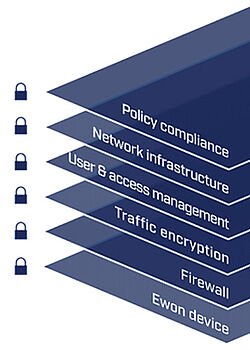
Security and reliability are two key aspects of the Talk2M Cloud. Talk2m is based on a "defense-in-depth" strategy that employs multiple layers of security controls - as shown in Figure 3-2.
The goal is to protect the integrity of the Talk2m connection and information system. The strategy is based on numerous industry publications, guidelines, best practices and established security standards, including
- ISO/IEC 27001 (International Organization for Standardization and International Electrotechnical Commission)
- U.S. National Institute of Standards and Technology (NIST): Framework for Improving Critical Infrastructure CybersecurityVersion 1.0
- Open Web Application Security Project (OWASP)
- Open Source Security Testing Methodology Manual (OSSTMM)
- IEC 62443 as a series of standards dealing with the security of operating technology in automation and control systems. Technical and process-related aspects of the security of automation and control systems.
From hardware devices to policies and procedures, security is a core competency that is embedded at every level of Ewon's solutions. The levels of Ewon's Defense-in-Depth strategy are as follows:
Ewon Gateway
You must be authenticated as a user and have administration rights. Traffic on the machine/LAN side is separated from the WAN/customer side, and you can only access authorized devices on the LAN. The specific controls cover four key aspects:
- Network separation: industrial routers are typically installed in the machine control panel - the machine is on one side (LAN), the factory network on the other (WAN). When a connection is required, the Ewon device acts as a Gateway and allows the required data traffic to pass through. Already during the initial configuration of the Ewon VPN access, the security settings restrict the data traffic between the two network interfaces. This separation limits remote access to devices connected to the Ewon LAN and prevents access to the rest of the network.
- Device authentication: The Ewon routers themselves have user-level access rights, separate from the Talk2m login. Only users with the appropriate access data and authorizations can change security settings on the Ewon. Accordingly, only authorized users can view or change data on devices with data services.
- Physical key switch: All Ewon hardware devices have a digital input. You can connect a switch to it; its status activates or deactivates the WAN connection. This gives the end customer full local control over whether the device is remotely accessible or not.
- IP assignment and control: The Ewon requires the same settings as a PC on the same network (IP address, subnet mask and Gateway as well as optional proxy settings). It can be configured to obtain these settings automatically via DHCP. Alternatively, it can be set to a static IP address, which - if desired - is assigned and controlled by the IT department.
Firewall
In the eCatcher application, Talk2M account managers or administrators can define filter and firewall rules: which devices behind the Ewon can be accessed remotely - and even via which ports (e.g. Ethernet, USB or serial) and with which protocols. Talk2m offers four different firewall rule levels based on device IP, ports, Gateways and access to Ewon services. From the least restrictive to the most secure level:
- Standard: access to all devices connected to the Ewon LAN is allowed.
- High: Access only to explicitly listed devices in the Ewon LAN; port restrictions are also possible.
- Enforced: Access to the Ewon Gateway can be blocked.
- Ultra: Access to Ewon device services such as HTTP, FTP and SNMP can be blocked.
In combination with Talk2m's user rights management, administrators can tailor remote access rights to selected user groups.
Encryption
Communication between you as a remote user and Ewon is fully encrypted and uses SSL/TLS. This guarantees the authenticity, integrity and confidentiality of the data. All users and Ewon units are authenticated with X.509 SSL certificates; end-to-end traffic is encrypted with strong symmetric and asymmetric algorithms.
User management and accountability
Each Talk2m account can contain an unlimited number of users. Administrators can create unique logins for each user who needs to access devices remotely. This makes it easy to assign and revoke access rights as needed. In addition, Talk2m account administrators can restrict which remote Ewons certain users can access, which services are accessible behind these Ewons and even which ports on the devices and which communication protocols are used.
For example, an administrator can allow remote users to reach the web services of a specific device for monitoring, while ports for programming changes are reserved for specific engineers only. Controls include:
- Role-Based Access Control (RBAC): Determines which users can access which machines and allows different levels of access.
- Unique user logins with individual password requirements (e.g. minimum length, letters, numbers, special characters, validity period and password history).
- Multi-factor authentication (MFA): You enter a one-time SMS code in addition to the user name and password.
- Audit trail and logging: Activities are recorded for each device so that it is clear who has connected, when and for how long.
Talk2M network infrastructure
Ewon regularly assesses the Talk2M architecture as part of the risk management framework. Appropriate controls are implemented to achieve maximum security effectiveness and comply with applicable regulatory requirements. Ewon has contracts with several hosting companies that fulfill the following requirements:
- Worldwide redundant Tier 1 hosting partners: to increase reliability, improve redundancy and reduce latency, Ewon works with multiple hosting partners worldwide.
- 24/7/365 monitoring: The server network is monitored around the clock to ensure maximum availability and security. Among other things, IDS and HIPS as well as various alarm mechanisms are used.
- Certified data centers: Relevant certifications include SOC 1/SSAE 16/ISAE 3402, SOC 2 and ISO 27001/27002/27017/27018.
- Corporate member of the Cloud Security Alliance (CSA): Ewon works with hosting partners who are corporate members of the CSA.
Policies and procedures
The Talk2m remote access solution is designed to fit with customers' existing security policies. With outbound connections through generally open ports (for example 443 and 1194) and compatibility with most proxy servers, the Ewon router interferes minimally with the network and works within existing firewall rules. Talk2m account administrators can customize password policies to enforce corporate compliance, and they can specify which users can access which devices remotely.
Talk2M account administrators can also use the Talk2M connection report to see which users have connected to which devices and when - and to check that corporate remote access policies are being adhered to.
To ensure the best possible business continuity, two service offerings are available:
- Talk2m Free+, the free quick start to get you up and running straight away - but without SLA and other features.
- Talk2m light, the next level with two simultaneous VPN connections, up to five mobile connections, extended firewall functions, higher data volume, with service level agreement (SLA)
- Talk2m Pro is a paid service with the SLA offered. In addition, Talk2m offers all the convenient services for professional use with user, device and firmware management. Even more data volume included. Unlimited mobile connections. 5 simultaneous VPN connections (optionally more). Data visualization in Talk2m.
The Talk2m pro service is designed for 99.6% uptime.
In order to offer these two service levels, the Talk2m architecture is supported by several policies and control objectives, including:
- Hosting provider SLAs: Talk2M Pro services are hosted through globally redundant Tier 1 hosting partners that provide 99.99 percent uptime for Internet access. For Talk2M Free+, multiple hosting partners are used, typically providing over 99 percent uptime.
- Acquisition of information systems: Key performance indicators (KPIs) of all servers are monitored. All information is displayed on a monitoring dashboard and also made available on an alarm server for Ewon's 24/7/365 employees.
- Server rollout: Multiple hardware providers ensure that VPN connections can be quickly rerouted from one VPN server (VS) to another in the event of a server problem.
- Continuous monitoring services: Talk2m services are continuously monitored by on-duty technicians.
To reduce network latency, data centers are located on five continents (North America, Europe, Asia, Africa and Australia) and Ewon continues to expand into other regions. Low latency is important for some industrial PLC protocols that work with small TCP/IP packets. These protocols are much more sensitive to timeouts caused by slow internet connections and long distances between you and your machines. Ewon products can dynamically connect to the geographically closest, least busy or most powerful VPN server (VS) to optimize performance and reduce latency.
 to top
 Contact
 Request form