


Guaranteed to stay up to date
To ensure that you are kept up to date, we would like to ask you to add our sender address news(at)wachendorff.de to your personal whitelist as a "safe address".
Because sometimes when you look through the spam or junk mail, you will also find emails from known senders that do not belong in the junk folder. For example, our monthly newsletter.
Please note:
The following instructions refer to Microsoft's Outlook e-mail program.
However, other email providers use very similar settings.
Case 1: Prevent our monthly newsletter from ending up in the junk folder in advance
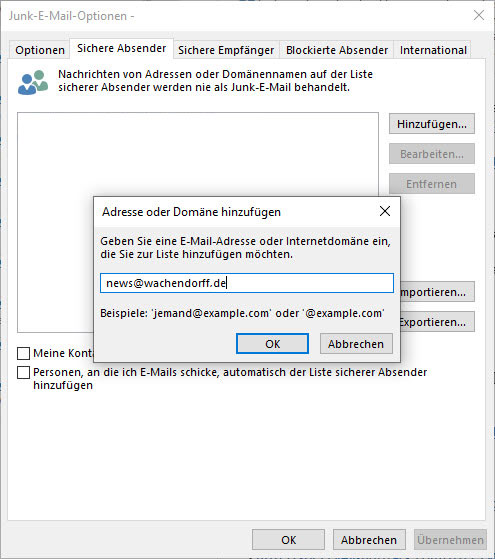
If you want to make sure that our monthly newsletter is not accidentally classified as spam by Outlook, please make the following setting:
- Click on "Junk e-mail" in the Outlook start menu.
- Select "Junk e-mail options" here.
- Under the "Safe senders" tab, you can enter the e-mail addresses that should never be treated as junk e-mail.
- We would be very pleased if you would enter our sender address news(at)wachendorff.de here!
Case 2: An e-mail with our monthly newsletter is in the junk folder
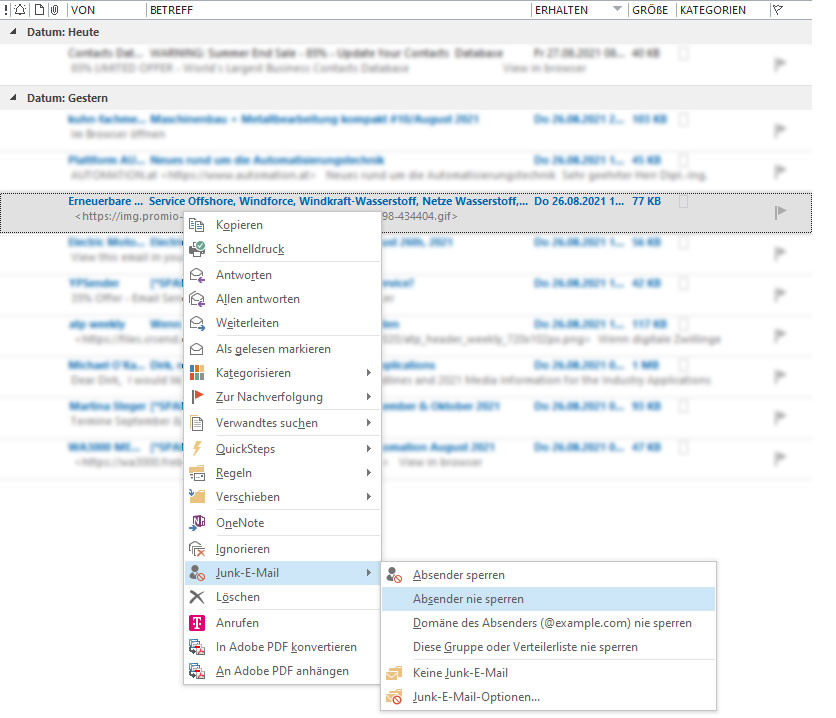
If our newsletter has already been incorrectly classified as spam and is in the Outlook junk folder, the following settings will help:
- Call up the junk folder in Outlook.
- Right-click on the e-mail that you do not want to have in the spam folder.
- Move the mouse over the "Junk e-mail" item and another window will open.
- Now click on "Never block sender".
 to top
 Contact
 Request form